


In this article
- Why everyone is looking for a Zapier alternative in 2026
- Zapier alternatives compared (2026)
- 1. Make
- 2. n8n
- 3. Activepieces
- 4. Pabbly Connect
- 5. Microsoft Power Automate
- 6. Workato
- 7. Relay.app
- How to migrate from Zapier to Make (without breaking anything)
- How we tested
- Which Zapier alternative should you choose?
- How we use Make at iweb.eu
- Frequently asked questions
- Final verdict
TL;DR: If your Zapier bill keeps climbing, you have two serious options in 2026. Make gives you 10,000 operations for $9/month — the same volume that costs $69+ on Zapier — plus a visual builder and AI agents. n8n is free if you self-host and don't mind maintaining a server. We also cover five niche picks (Activepieces, Pabbly, Power Automate, Workato, Relay.app), a step-by-step migration guide, and the full cost math.
We build and maintain automations for clients every week at iweb.eu — connecting CRMs, forms, invoicing, and AI models into workflows that run 24/7. That means we pay these bills ourselves and hit the limits of each platform in production, not in a demo account. This comparison is based on that experience plus current 2026 pricing.
Why everyone is looking for a Zapier alternative in 2026#
Zapier is still the biggest name in automation, with 9,000+ app integrations — more than anyone else. The problem was never features. The problem is the meter.
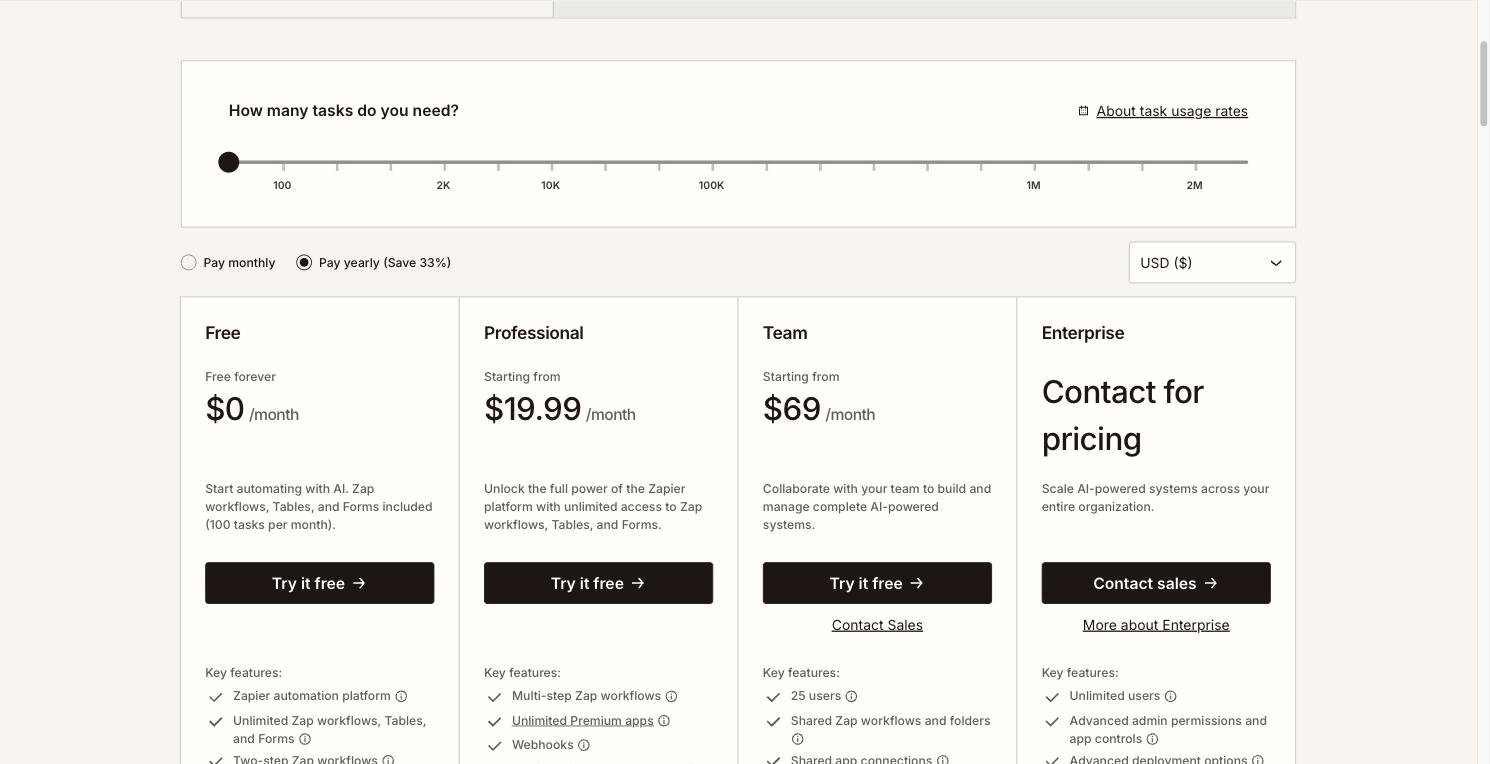
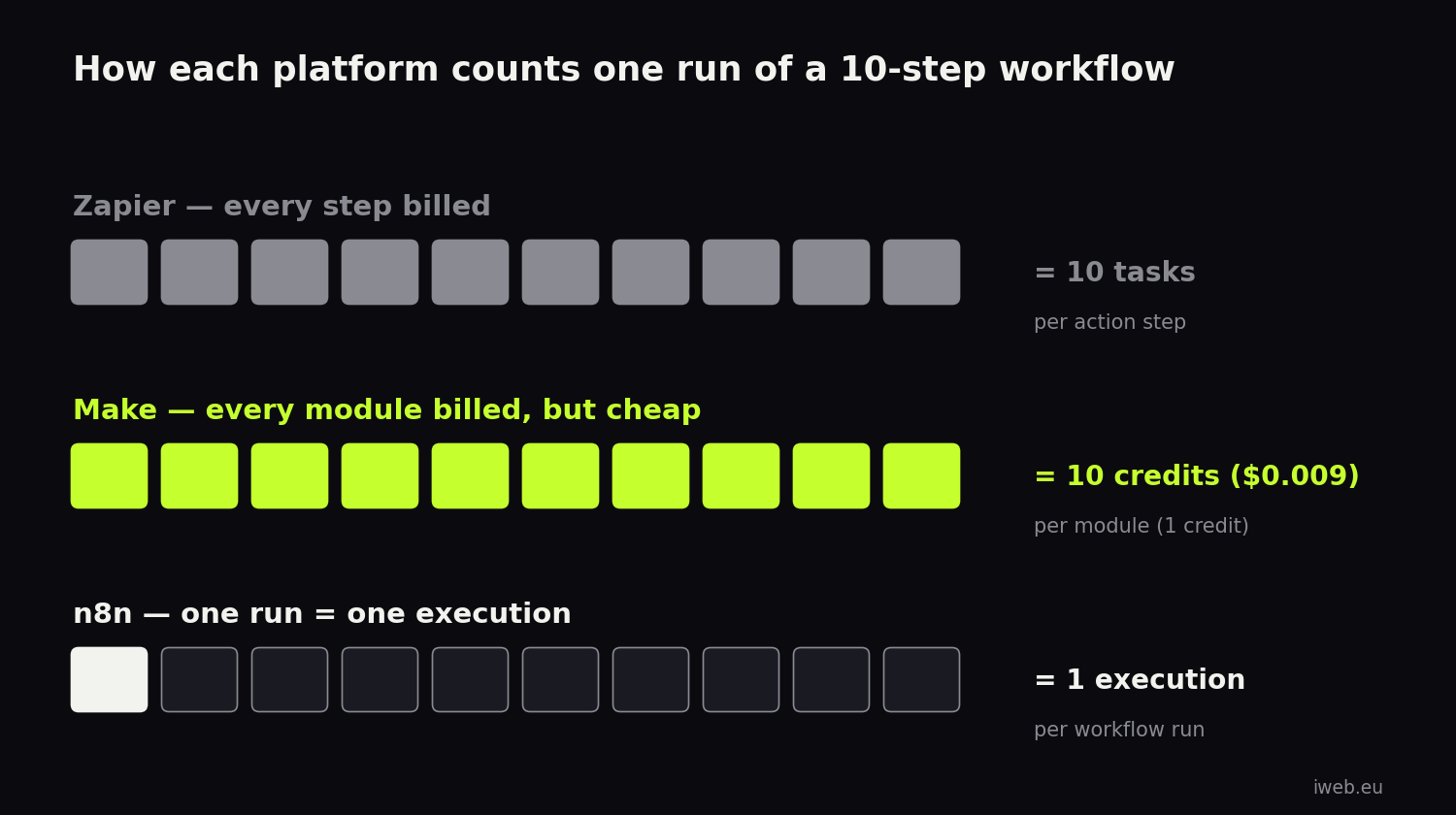
Zapier charges per task, and every action step counts as a task. A 10-step workflow that runs once consumes 10 tasks. The Free plan gives you 100 tasks a month and only 2-step Zaps. The Professional plan starts at $19.99/month (billed annually) for just 750 tasks — that's 75 runs of a 10-step workflow. Go over your limit and Zapier bills overages at 1.25× your base rate.
For a solo founder testing ideas, that's fine. For a business where automation actually does the work — lead routing, enrichment, invoice generation, AI content pipelines — task-based billing turns into a tax on your own growth. The more your business runs, the faster the bill compounds.
Zapier alternatives compared (2026)#
Prices and plan limits verified against vendor pricing pages, August 2026 · annual billing
| MakeOur pick | n8n | Zapier | |
|---|---|---|---|
| Entry paid plan | $9/mo — 10,000 credits | $20/mo — 2,500 executions (or free self-hosted) | $19.99/mo — 750 tasks |
| Free plan | 1,000 credits/mo, multi-step allowed | Unlimited (self-hosted Community Edition) | 100 tasks/mo, 2-step only |
| How usage is counted | Per module step (1 credit each) | Per workflow run — steps don’t multiply cost | Per action step (each = 1 task) |
| Integrations | 3,000+ apps | ~1,200 nodes + any API via HTTP | 9,000+ apps |
| Visual builder | Best-in-class drag-and-drop canvas | Node canvas, more technical | Linear step list |
| Branching & routers | Yes — even on Free plan | Yes | Higher plans |
| AI features | AI Agents, AI Toolkit, Maia builder (2026) | Native AI/LLM nodes, agent workflows | AI steps, Zapier MCP |
| Self-hosting | No | Yes, free | No |
| Learning curve | Low–medium | Medium–high (technical) | Lowest |
| Best for | Businesses & agencies that want power without a server | Developers and data-sensitive teams | Beginners who need a rare integration |
Make#the best Zapier alternative for most businesses
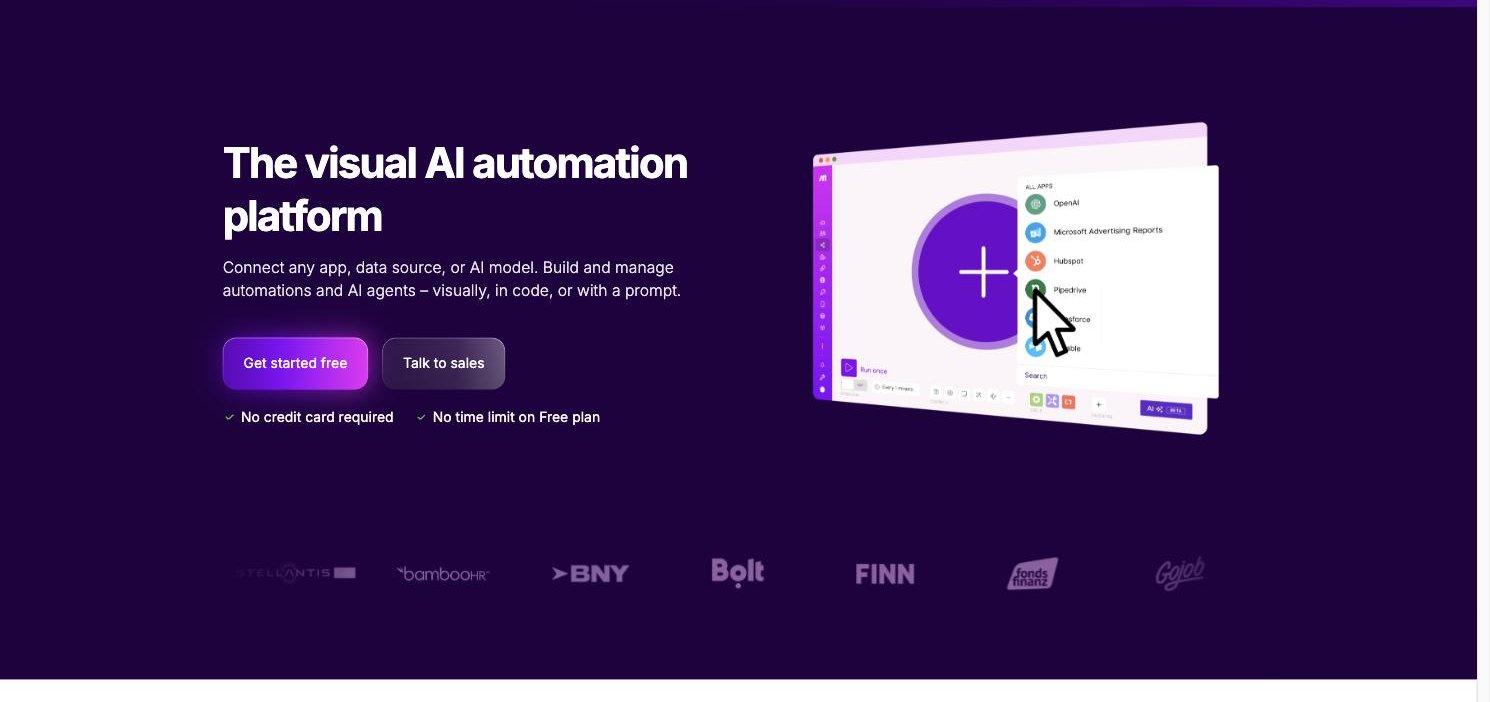
Make (formerly Integromat) is what most Zapier refugees actually land on, and for good reason: it sits in the sweet spot between Zapier's simplicity and n8n's developer power.
The visual canvas changes how you build
Instead of Zapier's linear "step 1 → step 2" list, Make gives you a visual canvas where workflows look like flowcharts. You see data flowing between modules in real time, you can branch with routers, add filters between any two steps, aggregate and iterate over arrays — logic that requires awkward workarounds (or a higher plan) in Zapier is just… there, including on the Free plan.
For anything beyond trivial two-app zaps, this matters. Complex scenarios that are painful to debug in Zapier are readable at a glance in Make.
Pricing: the math that makes people switch
Make switched to a credit system in 2025: one standard module operation = one credit (AI modules consume more, based on token usage). Plans in 2026:
- Free — 1,000 credits/month, multi-step scenarios allowed
- Core — $9/month for 10,000 credits
- Pro — $16/month, adds priority execution and advanced features
- Teams — $29/month, shared workspaces
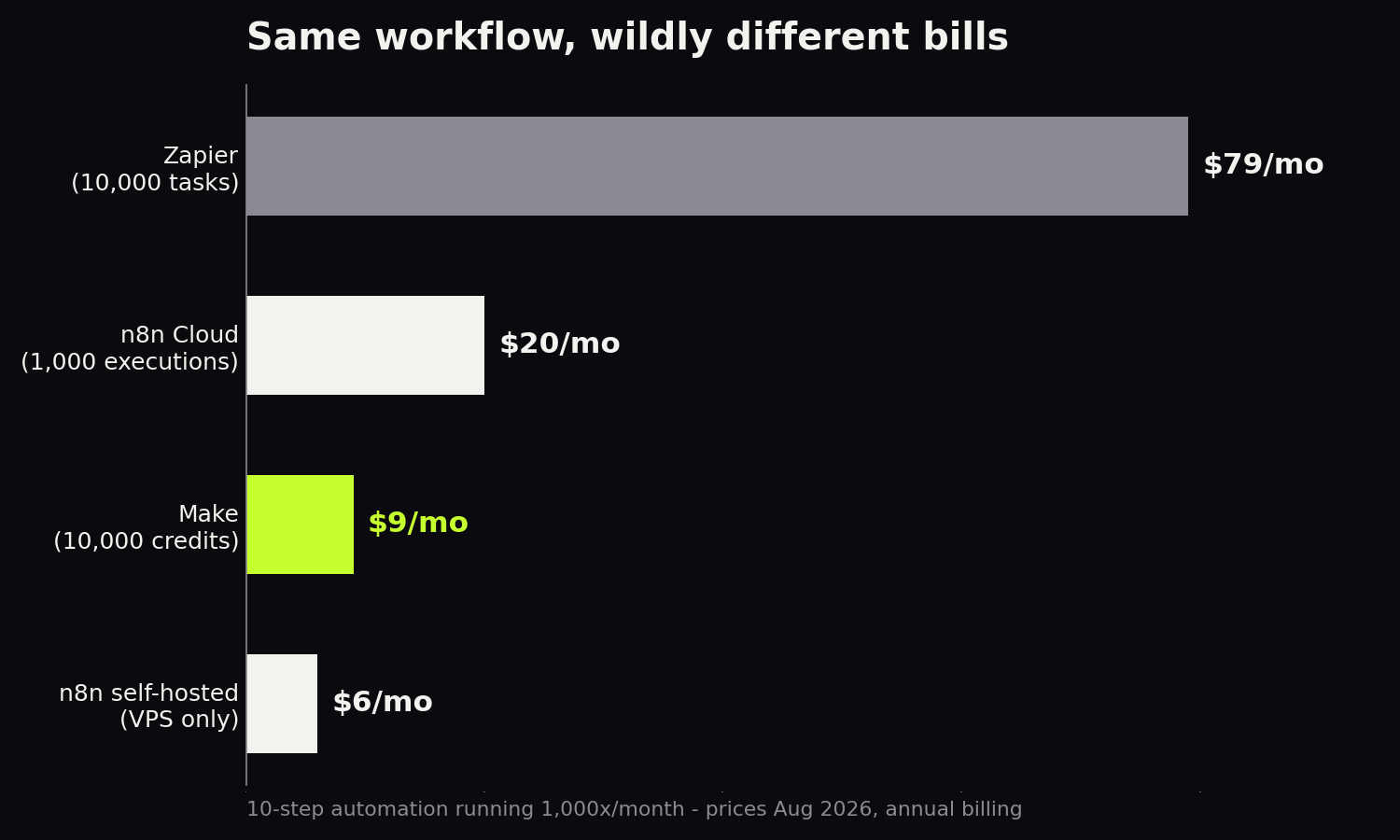
Here's the direct comparison. A 10-step workflow that runs 1,000 times a month consumes 10,000 operations. On Zapier that's a $69–89/month tier; on Make it's the $9/month Core plan — roughly 8–10× cheaper for the same automation volume. That's not a promotional angle; it's simply how per-step billing compares at the volumes real businesses run.
Same automations, ~10× smaller bill
Free plan: 1,000 operations/month. No credit card required.
AI in 2026: agents, not just steps
Make has been aggressive on AI: Make AI Agents let a workflow reason about what to do next instead of following a fixed path, the AI Toolkit wires GPT-class models into any scenario, and Maia — Make's conversational builder rolling out through 2026 — lets you describe an automation in plain language and get a working scenario. If your roadmap includes AI-driven workflows (lead scoring, document processing, content pipelines), Make is currently the strongest no-code option.
Where Make falls short
Honesty section. Make's 3,000+ integrations cover every mainstream tool, but if you depend on a niche app, Zapier's 9,000+ catalog may have it when Make doesn't (Make's generic HTTP module fills most gaps, but that's a step up in difficulty). The canvas also has a slightly steeper first hour than Zapier — budget an afternoon to get comfortable. And AI modules consume credits faster than standard ones, so heavy LLM pipelines need credit math.
n8n#best for developers and self-hosting
n8n is the technical crowd's favorite, and its momentum in 2026 is real — especially among AI builders.
The headline: the Community Edition is free and self-hostable. Run it on a $5–7/month VPS and you get unlimited workflows and unlimited executions. Your data never leaves your server — a genuine argument for GDPR-sensitive European businesses. Even n8n Cloud counts usage per workflow run, not per step: Starter is $20/month for 2,500 executions, Pro $50/month for 10,000, and a 50-step workflow still counts as one execution.
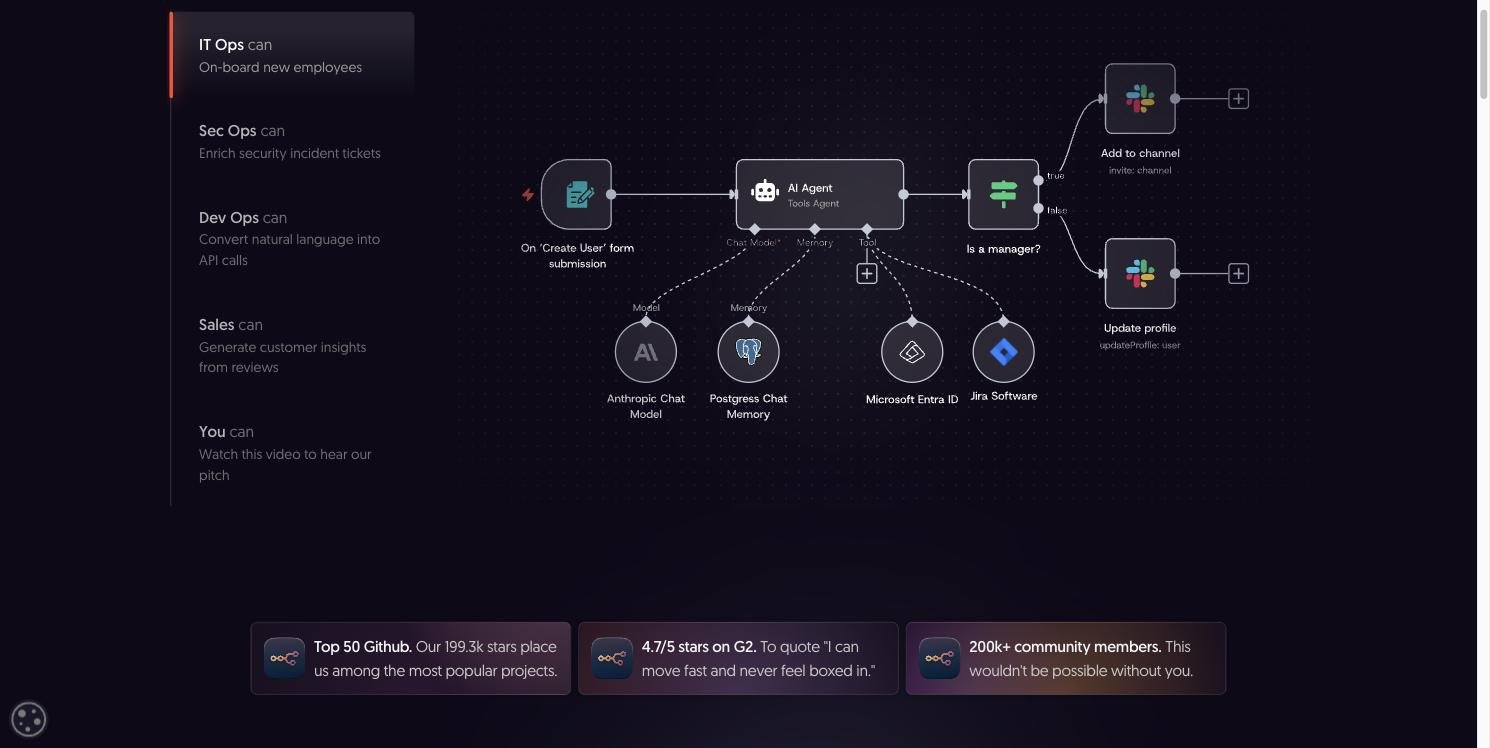
n8n also has excellent native AI/LLM nodes and has become a default choice for building agent-style workflows with full control over prompts and logic.
The catch: n8n assumes technical comfort. Self-hosting means you own updates, backups, scaling, and security. The node editor expects you to understand data structures; error messages expect you to read JSON. For a developer, that's Tuesday. For a marketing manager, it's a wall. Advanced features on the self-hosted Business tier also jump to $800/month, which surprises people who expected "free forever" to scale.
Activepieces#the open-source dark horse
Activepieces is what you get if n8n and Zapier had a minimalist child. It's open-source (MIT-licensed Community Edition you can self-host free), but its cloud product is where the pricing model gets interesting: the Standard plan is free for up to 10 active flows with unlimited runs, then $5 per active flow per month. No task counting. No execution counting. You pay for the number of automations, not how often they run.
For high-frequency workflows — a flow that fires thousands of times a month — that model beats everyone on this list. The catch is maturity: the integration catalog is far smaller than Make's or Zapier's, the community is younger, and complex branching logic isn't as polished. But the UI is genuinely the cleanest of the open-source options, and non-technical users can actually use it.
Pabbly Connect#the lifetime-deal outlier
Pabbly Connect's pitch is unique: instead of a subscription, you can buy lifetime access — one payment, roughly $249–799 depending on tier, and you get a fixed monthly task quota forever (2,000–10,000+ tasks/month). Every paid tier unlocks all features, unlimited workflows, and unlimited team members, with a 30-day money-back guarantee.
Two important details soften the headline. First, Pabbly doesn't count "internal" steps (filters, routers, formatters) as tasks — only actions in external apps — so a quota stretches further than Zapier's. Second, and less flattering: the integration catalog is smaller, the UI is functional rather than pleasant, and error handling is basic. This is a tool you buy with your calculator, not your heart.
Microsoft Power Automate#for Microsoft-first companies
If your organization lives inside Microsoft 365 — Outlook, Teams, SharePoint, Dynamics — Power Automate is the path of least resistance. It's bundled into many M365 enterprise licenses you may already pay for, integrates with Microsoft products at a depth no third party can match, and passes corporate IT approval without a fight.
Outside the Microsoft garden, the experience degrades fast: third-party connectors are weaker, the builder is clunky compared to Make's canvas, premium connectors cost extra, and licensing is famously confusing. Nobody chooses Power Automate on merit for a startup stack; they choose it because the company already standardized on Microsoft.
Workato#the enterprise heavyweight
Workato sits in a different weight class: enterprise integration platform (iPaaS) with recipes, governance, audit logs, SSO, and the security checkboxes a Fortune 500 procurement team demands. It's genuinely excellent — and priced accordingly, with custom quotes that typically start in the tens of thousands per year.
We include it for completeness: if you're reading a "Zapier alternatives" article to cut a $100/month bill, Workato is not your answer. If you're an ops leader at a 1,000-person company connecting Salesforce, NetSuite, and Snowflake with compliance requirements, it is.
Relay.app#human-in-the-loop automation
Relay.app is the newest name here and takes a distinct angle: workflows with human approval steps built in. An automation drafts the email, a person clicks approve, the automation sends it. The Free plan includes 200 automated steps and 500 AI credits monthly; the Professional plan is around $19/month, and all integrations are included on every plan — no connector paywall.
The catalog is still small and power features are thin, but for teams that want automation with a safety net — client-facing communications, HR workflows, anything where "fully automatic" feels risky — the human-in-the-loop model is a real differentiator.
How to migrate from Zapier to Make (without breaking anything)#
Migration fear keeps more people overpaying for Zapier than any feature ever did. Here's the process we use with clients — most teams complete it in one or two working days:
- Step 1 — Inventory your Zaps. Export the list, then sort into three buckets: business-critical (invoicing, lead routing), convenience (notifications, backups), and dead weight (that Zap from 2023 nobody remembers). Expect 20–30% to be dead weight you simply won't migrate — instant savings.
- Step 2 — Rebuild critical flows first, in parallel. Create a free Make account and rebuild your top 3–5 scenarios while the Zapier versions keep running. Make's modules map almost 1:1 to Zapier's triggers and actions — and the visual canvas usually makes the rebuilt version simpler, because routers and filters replace the duplicate Zaps you created to fake branching in Zapier.
- Step 3 — Run both for a week. Let Make scenarios run alongside Zapier (use filters to avoid duplicate outputs — e.g., process the same form into a test sheet). Compare results, fix mapping differences.
- Step 4 — Switch and downgrade. Turn off migrated Zaps, drop your Zapier plan to Free — or keep the cheapest tier if one niche integration has no Make equivalent. The hybrid setup is common and rational.
- Step 5 — Add the things Zapier priced out of reach. With 10,000 credits for $9, teams immediately add the automations they'd been rationing — enrichment steps, error-handling routes, AI processing. Automation stops being a budget item you minimize.
If you'd rather skip all five steps, we do Zapier-to-Make migrations as a service — audit, rebuild, parallel testing, documentation, handover.
How we tested#
This isn't an affiliate roundup written from pricing pages. iweb.eu is a web development and growth studio; automation platforms are part of our production stack, and the assessments above come from building and maintaining client workflows: lead capture and CRM routing, invoice generation, reporting pipelines, and AI content workflows. For this comparison we additionally verified every price and plan limit against the vendors' current published pricing in August 2026, and rebuilt the same reference workflow — a 10-step lead-enrichment scenario — on Make, n8n, and Zapier to compare cost, build time, and debuggability. Where a tool wasn't a fit for us (Workato, Power Automate), we say so and explain who it is for.
Disclosure: some links in this article are affiliate links, including Make. It costs you nothing and doesn't change our rankings — n8n, which pays us nothing, gets an unreserved recommendation for technical teams.
Which Zapier alternative should you choose?#
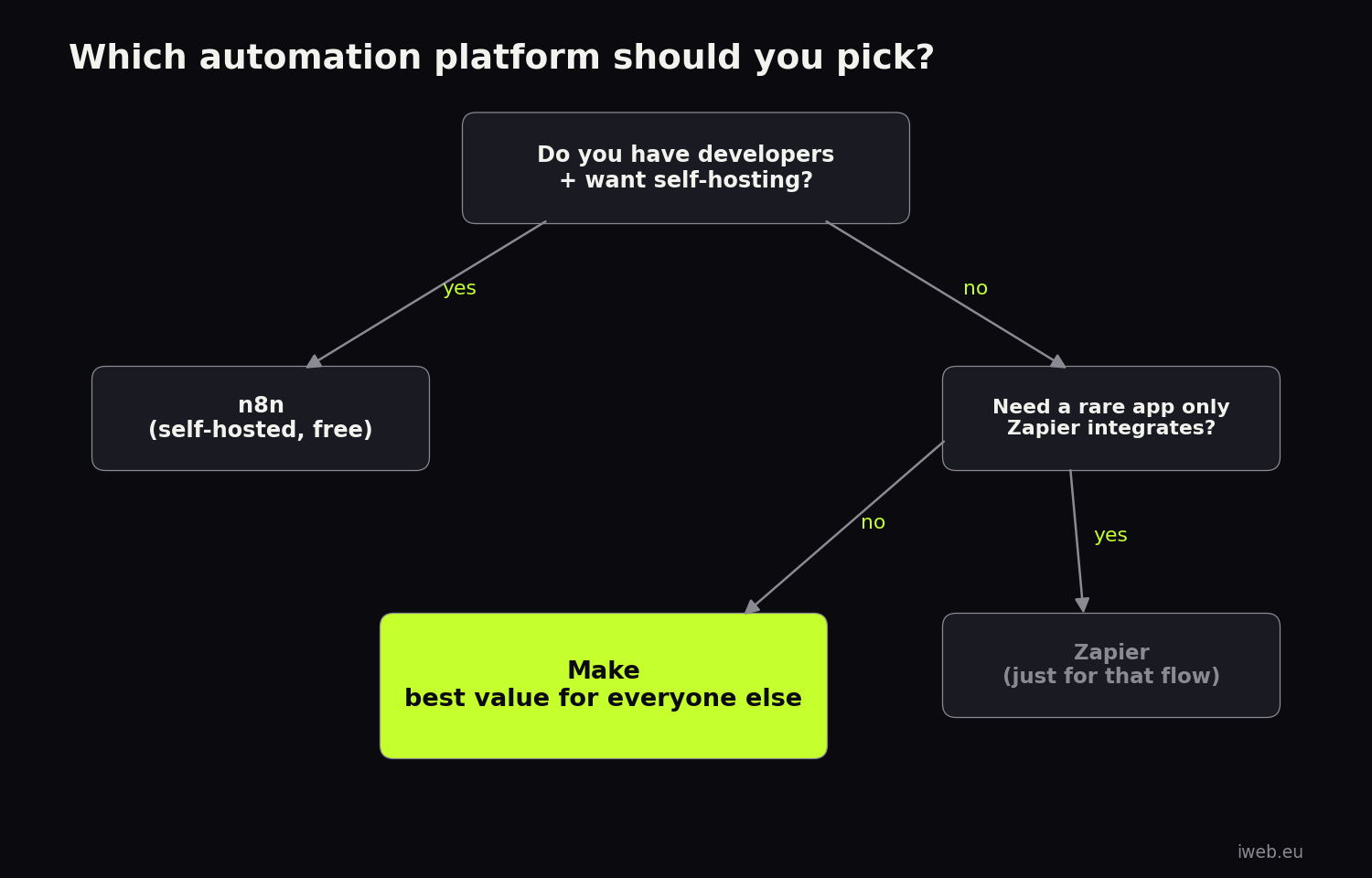
- You want the cheapest serious option and no servers → Make. 8–10× cheaper than Zapier at volume, visual builder, AI agents.
- You have developers and/or strict data requirements → n8n, self-hosted.
- You need one specific niche integration only Zapier has → stay on Zapier for that workflow; move the volume-heavy ones to Make. Running both is a common and rational pattern.
- You're 100% Microsoft → Power Automate.
Made your choice?
Start on Make’s free plan — upgrade to 10,000 ops for $9/mo only when you need it.
How we use Make at iweb.eu#
We're a web development and growth studio, and Make is part of our production stack: lead-capture flows from client websites into CRMs, automated reporting pipelines, AI-assisted content workflows, invoice and notification automations. When we migrate a client from Zapier to Make, the typical result is a 60–90% lower automation bill and scenarios the client can actually read.
If you'd rather have the whole thing designed and built for you — that's literally a service we offer. We map your processes, build the scenarios, and hand over documentation. Get in touch for a free automation audit.
Frequently asked questions#
What is the cheapest Zapier alternative?
Self-hosted n8n is technically the cheapest (free software + ~$5/month server) if you have technical skills. For non-technical users, Make is the cheapest serious option: $9/month buys 10,000 operations — volume that costs $69+ on Zapier.
Is Make really cheaper than Zapier?
At meaningful volume, yes — typically 8–10×. Both count individual steps, but Make’s credits cost far less: 10,000 operations are $9/month on Make Core versus roughly $69–89/month on Zapier. Zapier is only cheaper if you barely automate anything.
Is Make better than Zapier for AI automation?
For building AI-driven workflows, Make currently offers more control: AI Agents, an AI Toolkit for wiring LLMs into scenarios, and the Maia conversational builder. Zapier’s AI features prioritize simplicity over control. Developers wanting full control should also look at n8n.
Can I switch from Zapier to Make without losing my workflows?
There’s no one-click import, but rebuilding is usually faster than expected — most teams migrate their core Zaps in a day or two, and the visual canvas makes the logic easier to maintain afterwards. We also offer migration as a service.
Is n8n hard to use for non-developers?
Harder than Make or Zapier. The interface assumes comfort with data structures and APIs, and self-hosting adds server maintenance. Non-technical teams almost always do better on Make.
Does Make have a free plan?
Yes — 1,000 credits per month, multi-step scenarios and routers included, no credit card required. That’s enough to run real small automations, not just a trial.
Is Zapier still worth it in 2026?
For two cases, yes: if you automate very little (the Free plan’s 100 tasks may be all you need), or if you depend on a niche app among Zapier’s 9,000+ integrations that competitors don’t cover. For everyone running automation at real volume, per-task pricing makes Zapier hard to justify against Make or n8n.
Can Make completely replace Zapier?
For the vast majority of workflows, yes — Make’s 3,000+ apps cover every mainstream tool, and its HTTP module can talk to any API for the rest. The honest exception: a long-tail app with a Zapier integration but no Make module and no public API. Many teams keep a free Zapier account for exactly one such workflow and run everything else on Make.
What is the best free Zapier alternative?
Self-hosted n8n (unlimited executions, free software) if you’re technical. Make’s Free plan (1,000 credits/month with multi-step scenarios) if you’re not — it’s far more usable than Zapier’s free tier, which locks you to 2-step Zaps. Activepieces’ free cloud tier (10 active flows, unlimited runs) is a strong third option.
Which Zapier alternative is best for AI agents?
Make and n8n are the two serious choices. Make offers the best no-code experience: AI Agents, the AI Toolkit, and the Maia conversational builder. n8n gives developers deeper control over prompts, memory, and logic. Zapier’s AI features are the easiest to start with but the shallowest at scale.
How long does it take to switch from Zapier to Make?
For a typical small business with 10–20 Zaps: one to two working days of rebuilding, plus a week of running both platforms in parallel to verify results.
Does Zapier charge for every step in a workflow?
Every action step consumes a task (triggers and filters don’t). A 10-step Zap running 1,000 times a month therefore burns roughly 10,000 tasks — which is why multi-step workflows get expensive on Zapier much faster than on Make or n8n.
Final verdict#
Zapier earned its place by making automation accessible, but in 2026 its per-task pricing is the single biggest reason businesses look elsewhere. For most companies the answer is Make — near-Zapier ease of use at a fraction of the cost, with the strongest no-code AI tooling on the market. For developer teams, self-hosted n8n is unbeatable value. Either way, the era of paying $100+/month for basic workflow automation is over.
Stop paying the per-task tax
10,000 operations for $9/month. Visual builder, AI agents, 3,000+ apps.
Want automations built, documented, and maintained for you? Talk to iweb.eu — we'll audit your current stack for free.